Quick Answer — Install These Before You Land
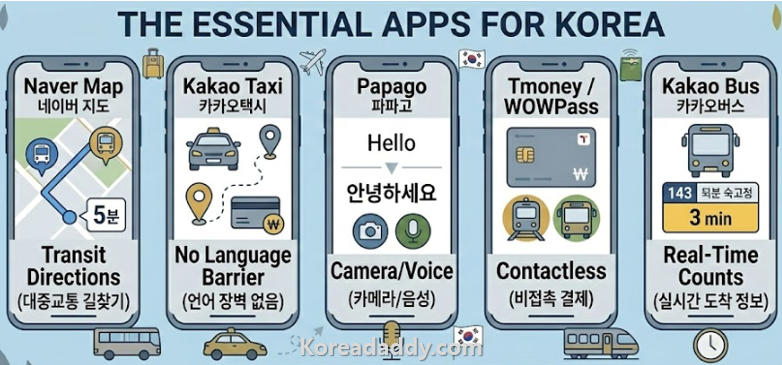
- Navigation: Naver Map
- Taxi: Kakao Taxi
- Translation: Papago
- Transport card: WOWPass or Tmoney Pay
- Bus tracking: Kakao Bus
- Food delivery: Baemin (longer stays)
- Banking: Wise
Every “korea travel apps” article lists 15–20 apps. You’ll install them all, use three, and forget the rest. This guide covers the apps that actually get used — and exactly why each one matters.
Daddy’s Note: I’m recommending these because they work, not because they’re popular on travel blogs. A few are Korean-language only — I’ll tell you exactly what to tap.
All Korea Travel Apps Compared
| App | What It Does | Language | Essential? |
|---|---|---|---|
| Naver Map | Navigation, transit, walking | English available | ✅ Yes |
| Kakao Taxi | Ride-hailing, like Uber | English available | ✅ Yes |
| Papago | Translation, camera mode | English | ✅ Yes |
| Kakao Bus | Real-time bus tracking | Korean only | ✅ Yes |
| WOWPass / Tmoney Pay | Digital T-money card | English available | ✅ Yes |
| Baemin | Food delivery | English available | ⚠️ Long stays |
| Wise | ATM withdrawals, exchange | English | ⚠️ Recommended |
| Google Maps | Navigation | English | ❌ Skip — inaccurate in Korea |
Navigation — Naver Map
The most important of all korea travel apps. Google Maps works poorly in Korea — Korean mapping data is legally restricted from being fully licensed to Google, which means directions, transit times, and walking routes are often wrong or missing entirely. Naver Map has complete, accurate Korean data and a full English interface.
How to use: Download “Naver Map” → tap the globe icon to switch to English → search any destination in English or Korean. Transit directions show exact bus numbers, subway lines, walking times, and live arrival countdowns.
Killer feature: “Find nearby” function shows convenience stores, ATMs, pharmacies, and restaurants with real operating hours — not the guessed hours Google sometimes shows.
Accessible route setting: Enable this in settings for elevator-only navigation — essential if you have mobility needs or heavy luggage.
Taxi — Kakao Taxi
Korea’s dominant ride-hailing app. Works exactly like Uber — enter your destination, see a price estimate, a driver accepts, and you get picked up. Payment by credit card in-app. The driver cannot overcharge you.
Setup tip: Register before arriving in Korea. You’ll need a phone number for verification — your home country number works during signup. Switch to your Korean SIM number after arrival if needed.
Why it matters at night: Set your destination before leaving the venue or your hotel. Walk out, open the app, your driver is already on the way. No language barrier, no meter anxiety, no negotiation.
Black option: Kakao Taxi also offers a premium “Black” tier — higher-end vehicles, English-speaking drivers at some times. Worth knowing for airport runs with luggage.
Translation — Papago
Made by Naver specifically for Korean-Japanese-Chinese translation. Significantly more accurate than Google Translate for Korean. The camera translation feature — point your phone at Korean text — works well for menus, signs, medicine labels, and product packaging.
Offline mode: Download the Korean language pack before your trip. Works without internet for basic translation — useful in subway dead zones and rural areas.
vs Google Translate: For Korean specifically, Papago handles food vocabulary, nuance, and casual Korean significantly better. Google Translate is fine for European languages. For Korea, use Papago.
Transport Payment — WOWPass or Tmoney Pay
You need a T-money card for subway and bus travel in Korea. Two options for foreign visitors:
- Physical T-money card: Buy at any convenience store for ₩3,000, load with cash at the counter. Simple, reliable, works everywhere.
- WOWPass: Designed specifically for foreigners — load with foreign currency at Incheon Airport kiosks, use as T-money and a debit card at convenience stores. Eliminates the need for Korean cash for small purchases.
- Tmoney Pay app: Digital T-money card on your phone. Works with NFC-enabled phones.
Bus Tracking — Kakao Bus
Real-time bus arrival countdowns, accurate to the minute. Korean language only — but simple enough to use without reading Korean. The numbers on the right side of each bus listing are minutes until arrival.
- “곧 도착” = arriving now — move to the stop
- “운행종료” = service finished for today
- Numbers = minutes until arrival
Best use: Plan your route on Naver Map in English, then switch to Kakao Bus at the stop for the real-time countdown. The two apps work best together.
Food Delivery — Baemin (배달의민족)
Korea’s dominant food delivery app. English interface available. Delivers from virtually every restaurant to your accommodation address. Not essential for a short trip but invaluable for stays longer than a week — particularly useful on rainy days or late evenings when you do not want to go out.
Minimum orders are low, delivery is fast (often under 30 minutes in cities), and many menus have photos even if the text is Korean. Papago camera mode handles any remaining translation.
Banking — Wise
Not a Korea-specific app, but one of the most useful korea travel apps for managing money. Wise gives you near-interbank exchange rates with low, transparent fees for ATM withdrawals in Korea — far better than airport exchange booths or your home bank’s international transaction fees.
Set up the Wise card before you travel. Use it at 7-Eleven or GS25 ATMs, which have the most reliable foreign card acceptance in Korea.
Apps You Don’t Actually Need
- Google Maps — works poorly for Korean transit, use Naver Map
- Most “Korea travel guide” apps — outdated information, use websites instead
- Korean Air / Asiana apps — only if flying those specific airlines
- Klook / Viator — useful for booking tours but not daily navigation
Daddy’s Final Setup Checklist
- Install Naver Map — switch to English in settings
- Install Kakao Taxi — register with your phone number before arrival
- Install Papago — download Korean offline language pack
- Install Kakao Bus
- Get WOWPass at Incheon Airport on arrival, or buy a physical T-money card at any convenience store
- Set up Wise card before you leave home
That is genuinely all you need. Everything else is optional. Five apps and one card covers navigation, transport, translation, taxis, and money — the five things that actually matter when you arrive somewhere new.